Where the answers are written down
Agentic workflow tools, judged on four pages, open-source Kortix first
Feature lists for agentic workflow tools count connectors and templates, and skip the pages that decide the answer. Four documents on any vendor's own site carry it: the reference for the workflow, the pricing page, the isolation page and the repository. The open-source Kortix CompanyOS publishes all four, and its reference is a file you open in an editor.
The open-source CompanyOS
SOC 2 Type I verified · Self-host is free · VPC or your own on-prem network
kortix.yaml · project
Source: kortix.com/automations
# yaml-language-server: $schema=https://kortix.com/schema/kortix.schema.jsondefault_agent: kortixproject: name: arcadia description: Arcadia runs engineering, marketing and sales on Kortix.Three tools, read on the pages that decide the work
The same rows put to each column, and the machine a run gets is one of them.
kortix.yaml, at the root of the repogh aw compile pins into an Actions workflowmainSource · KortixSource · GitHub Agentic Workflows
GitHub's Agentic Workflows documentation covers the repository a run touches, the read-only default and the review before a merge. Gumloop's pricing page lists the plans and no self-host option. Checked October and November 2026.
What a demo hides
Open a vendor's documentation and a feature matrix gives way to a plainer difference. A builder hands you a canvas: nodes joined by lines, each one a call to an app, a branch or a transform. The agent is a single node inside that picture. That design solves a real problem, making a few dozen SaaS APIs behave as one sequence, and it settles where the work happens.
Zapier runs the steps you define on its own workers, calling endpoints your stored credentials already reach. Zapier Agents go further. You grant an agent a set of actions from the app library, and it chooses which to use and completes the fields each action requires (Zapier).
Gumloop answers the machine question with a sandbox. Each conversation runs in its own secure cloud sandbox. That sandbox is an isolated VM, and the agent runs shell commands inside it, creates and modifies files, and installs packages with pip install and npm install (Gumloop).
Four documents on a vendor's own site say more about that than any demo does. Each one is a page you can open before a call.
Page one: the reference for the workflow
The first document defines the workflow itself. In Kortix it is kortix.yaml, at the root of your repo. In GitHub Agentic Workflows it is a prompt that gh aw compile pins into an Actions workflow. In n8n it is a canvas, self-hosted or on n8n Cloud. Read this page for one thing: whether the definition is a file with a history, or a record that lives inside a product.
Page two: the pricing page
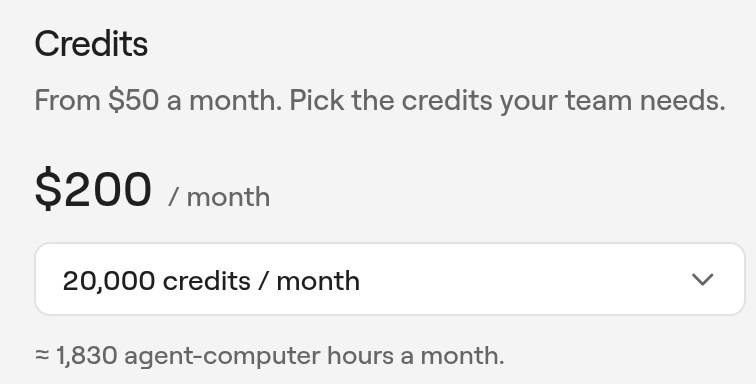
Every vendor publishes one, and it answers a question a feature list cannot. Kortix prices credits in 25 tiers from $50 a month. GitHub sets a budget guardrail on by default at 1,000 AI Credits per run and 5,000 per day. Gumloop starts Pro at $37 a month, with Enterprise priced on request. Hunt for the ceiling at a busy month rather than the entry price. A per-run cap and a per-task bill fail differently once a schedule gets busy.
Page three: the page on isolation
The third document says where a run happens and what it may touch. Gumloop's docs describe the isolated VM each conversation gets and the shell inside it. GitHub's docs describe agent runs that read by default, with writes applied by a separate job as safe outputs. In Kortix, one isolated sandbox per session, and each session has its own isolated machine and branch. The run installs, edits and deletes on a computer that disappears with it.
Page four: the repository and its changelog
The fourth is the repository. GitHub publishes the gh-aw source in the open, so every step it runs can be read before you rely on it. n8n publishes its code too, and keeps part of it for paying customers. Gumloop's pricing page offers no self-host option and nothing to read. Then read the changelog. A page that names behavior changes tells you more about the next year than a page that lists new connectors.
GitHub's product gets the same reading in GitHub Agentic Workflows, from the workflow file to the pull request where a person reads the result.
n8n, on its own terms
n8n is the builder most teams meet first, because it is the one you can run yourself. It self-hosts, and pricing runs per monthly workflow execution. A team that wants a canvas, its own server and a bill tied to executions has a fair reason to choose it. Somebody should check which parts of the code they get before they plan around it.
The agent in n8n still works as a node. When your process is a series of API calls with a model inside one of them, the graph is the right artifact. You can version it, review it and keep it. The limit arrives later. What the agent may do is whatever that node type exposes, and the step belongs to the graph rather than to the work.
Zapier, on its own terms
Zapier trades depth for reach and asks nothing of your infrastructure. Task-based pricing runs across plans from a free tier, cloud only, and approval requests are listed as Beta. A small team connecting two SaaS products has no server and no wish to run one. For that team Zapier is the better pick, and the Beta label is honest about where the approval feature stands.
The run stays inside Zapier's cloud. You get the automation and a task count, and you can audit both. The agent works through the actions you grant it rather than a machine you hand it.
The other eight, sorted by where the workflow lives
The same question sorts the rest of the field. Two of these products keep the workflow in a file you can open, five keep it on a canvas inside the product, and one keeps it in a conversation. Prices are each vendor's published rate, checked in November 2026.
Two keep it in a file
CrewAI is an open-source Python framework. A project keeps its agents in agents/*.jsonc and its tasks and crew settings in crew.jsonc, and crewai run loads that JSON directly (CrewAI). The free Basic plan allows 50 workflow executions a month, and Enterprise is quoted (pricing). Its docs describe processes with guardrails, callbacks and human-in-the-loop triggers (docs).
LangGraph is an open-source Python library. You define a workflow as a graph of shared state, nodes and edges in your own code, and a run can pause so a person inspects or edits the state before it continues (LangGraph). You run the library yourself; LangSmith Deployment bills resource time in LangChain Standard Units at 1 LSU = $1 (LangChain pricing).
Five keep it on a canvas
Dify is an open-source platform. Its Workflow Studio puts the logic on a collaborative visual canvas, and a Human Input node pauses the run for a person to approve, edit or forward it (Dify). The Professional plan is $590 per workspace a year, with 5,000 message credits and 20,000 trigger events a month (pricing). The Community Edition self-hosts with Docker Compose (docs).
Microsoft Copilot Studio is a graphical, low-code studio. A workflow is built with a drag-and-drop designer and can include human review steps (Microsoft Learn). It is sold in packs of 25,000 Copilot Credits at $200 a pack a month, or metered pay-as-you-go (pricing). The pricing page offers no source or self-host option.
UiPath builds agents in Studio Web on a node canvas, and an escalation node is how a run hands a decision to a person (UiPath docs). Its pricing page caps agent calls on Basic and leaves them unlimited on Standard and Enterprise (pricing). It quotes no per-call price, and offers a self-hosted install on the two higher tiers.
Make calls the workflow a scenario and builds it on a visual drag-and-drop canvas. Each module action in a run counts as one credit, and Core is $9 a month when billed yearly, at $0.90 per 1,000 credits (Make pricing, credit costs). The pricing page lists AWS hosting in the EU or North America and no self-host option.
Relevance AI is a low-code platform that links agents into workforces on a visual canvas, with approval workflows for the steps that need a person (Relevance AI docs). Pro is $19 a month on annual billing, $29 monthly, for 2,500 Actions a month (pricing). An Action is counted each time an agent runs a tool.
One keeps it in a conversation
Lindy keeps the work in skills and routines inside the product, and you describe them in a conversation (Lindy docs). Anything with outside impact waits for your approval before it sends, posts or publishes. Every active user in your workspace is billed, from $29.99 a month for 3,000 credits each, and the pricing page offers no source or self-host option (pricing).
What the split decides
The split shows up in what you can carry. A file you keep can be diffed, reviewed and moved to another machine. A canvas is a record inside a product, and so is a conversation. A migration has to cross that line.
What the four pages add up to
The machine is the answer the first three pages converge on. Here each session gets its own isolated machine and branch, and session work reaches main through a change request. Merge is default-deny for agents, so a run cannot put its own work into the default branch on its own authority. A person reads the diff before it lands.
That is the pair to hold any tool to. A page can promise agents that decide for themselves. The documents say where the run happened, what it touched and who could refuse the result.
Questions about agentic workflow tools
What is an open-source tool for running agentic workflows?
Kortix CompanyOS keeps the trigger, the agent and the review in one repo you own. It is open source, so you can read it, fork it and audit it. The definition lives in kortix.yaml, and each session gets its own isolated machine and branch.
Is there an agentic workflow tool you can self-host?
Yes. Kortix runs on Kortix Cloud, in your VPC or on your own on-prem network, and self-host is free. GitHub Agentic Workflows also runs on your own Linux runners, including ARC, though every workflow it runs stays bound to a repository.
How do agentic workflow tools differ from workflow builders?
A builder gives the agent a step inside a canvas you do not own. An agentic workflow tool gives it a computer to work on, so it can install a package, run a script and leave a diff instead of passing a payload to the next node.
What should I look for in an agentic workflow tool?
The reference that defines the workflow, the pricing page with its worst-case ceiling, the page on isolation, and the repository with its changelog. A vendor that publishes all four has answered the question before the call.
Can an agentic workflow tool run on my own infrastructure?
Yes, if it was built for it. Kortix self-hosts on your own network or in your VPC, and each session runs on its own isolated Linux machine with your repo and tools on it.
Read the four pages before the sales call.
The reference, the price, the isolation page and the repository answer most of what a demo leaves out. Kortix is my pick on those four pages, and I work on Kortix's marketing, so weigh that accordingly.